
Storyboard: editing scenes, redrawing frames
Generate storyboard reads the length and the structure of your audio and cuts it into scenes — with timecodes, shot sizes and camera moves. The cuts follow the track, not an even grid, which is why a scene can be four seconds and the next one nine.
This step is free, and so is regenerating it. Read the whole strip before you spend anything on pictures.
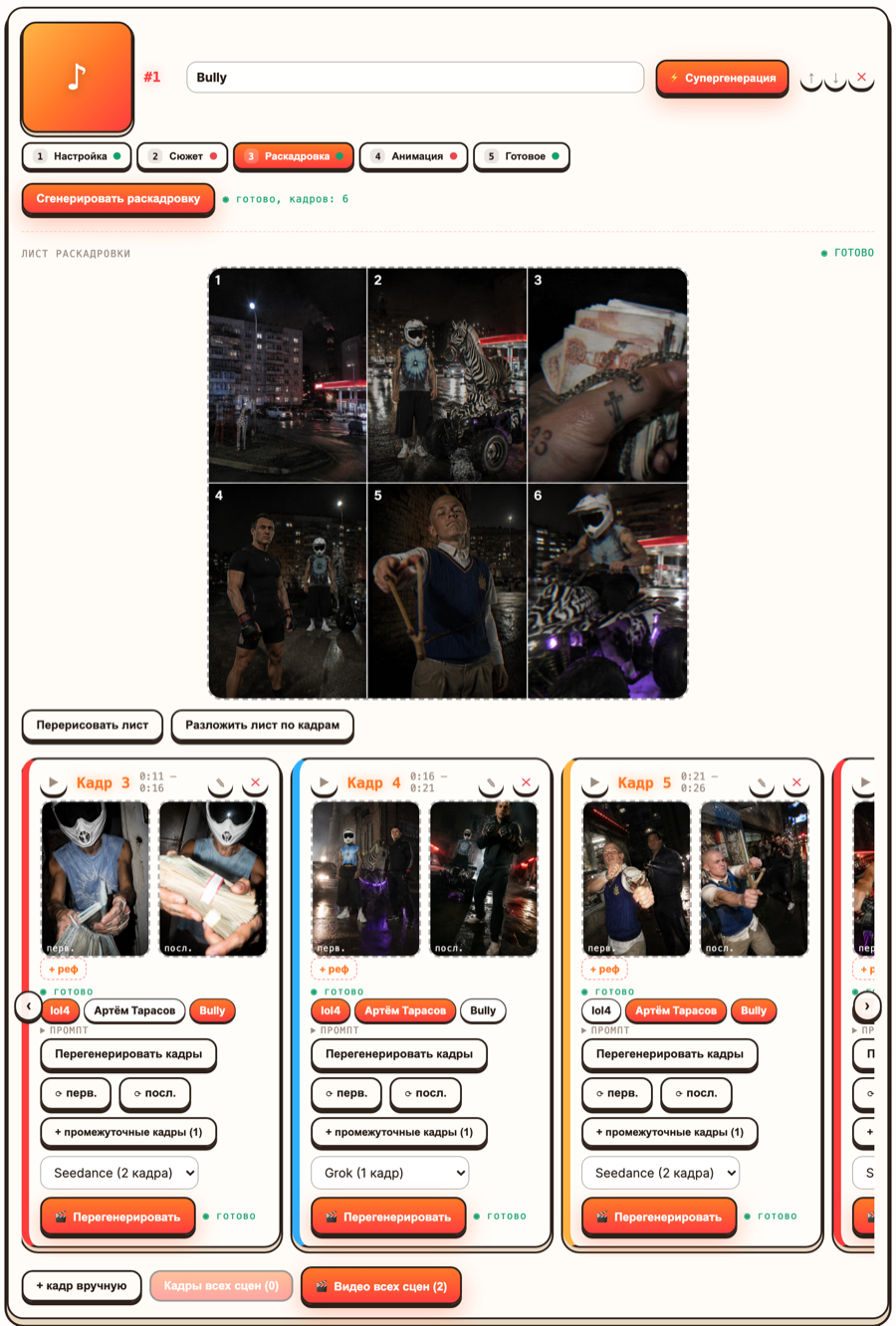
!The storyboard stage: the sketch sheet and the strip of scene cards
The sketch sheet
Next to the strip there is Generate sheet: the whole storyboard drawn as one page of thumbnails. Open large shows it full screen.
Its real use is not decoration. Seeing thirty frames at once is the only cheap way to notice that scenes 4, 11 and 22 are the same shot, or that the whole clip is medium shots with no wide to breathe in. Fix that on the sheet and you have saved yourself thirty redraws.
Split the sheet into frames slices the grid and makes each cell the first frame of its scene. Useful when the sheet came out better than the individual frames would have.
The sheet costs 2 credits on the free and PRO plans, 8 on PRO MAX and STUDIO.
The scene card
Open a scene and you get the fields the frame generator actually reads:
- prompt — the first frame prompt. The literal description of the picture.
- last frame prompt — where the scene ends up. Paid engines interpolate
between the two; on Grok only the first frame is animated.
- motion prompt for the scene — what moves, and how.
- shot size — extreme close-up, close-up, medium, wide, establishing.
- camera move — free text, e.g. *slow push-in*.
- seconds — the length of the scene.
- lyric line and what happens in the frame — the context the model uses.
- characters in the scene — click to toggle who is present, and which of their
attributes come with them.
- + ref — attach your own image as a sample of composition, light or vibe.
The play button on the card gives you the slice of the track under that scene. Use it. A scene that reads fine on paper is often obviously wrong against its four seconds of music.
Save scene before regenerating anything, or you will redraw the old text.
What each button costs
This is the part worth memorising, because it decides how you work:
| Action | Cost |
|---|---|
| Editing scene text, regenerating the storyboard | free |
| Generate frames — first time for the scene | the frame price of your plan |
| Regenerate frames, ⟳ first, ⟳ last | free |
| + in-between frames | included in the scene price |
| Animate scene — first time | the video price of your engine |
| Re-animate | the video price again |
The rule behind the table: a scene has a price, you pay up to it once, and anything that does not cost us more money does not cost you more credits. Redrawing pictures is free. Re-rendering video is a new call to a paid engine, so it is charged again — 2 credits on Grok, 152 on Seedance 2.5.
Practical consequence: get the frames right before you animate anything. All the iteration is on the free side of that line.
Choosing the repair
The idea is right, the picture is flawed — a broken hand, a face that drifted, a stray object. Press ⟳ first. Same prompt, new draw. It is free, so run it two or three times if you have to; you are effectively rerolling.
The last frame does not belong to the same scene — different room, different time of day, a character who changed clothes. Press ⟳ last. The first frame stays and the motion has somewhere sane to go.
Both frames are fine, the scene is boring — this is not a frame problem. Change shot size. Going from medium to extreme close-up, or from medium to establishing, is the cheapest large change available and it costs nothing but a redraw. Most flat storyboards are flat because everything is a medium shot.
The composition is wrong in a way you can show but not describe — attach a reference with + ref and redraw. One image is worth a paragraph of prompt.
The scene is the wrong idea — edit what happens in the frame and the prompt, save, then Regenerate frames. Still free.
The scene should not exist — delete it. A thirty-scene clip with three dead scenes is worse than a twenty-seven-scene clip. On the free plan, deleting a scene you have not animated yet also leaves credits for the ones that matter.
The motion is dead but the frames are good — rewrite the motion prompt and Re-animate. This one costs. Do it once, deliberately, after you have decided the frames are final.
In-between frames
+ in-between frames draws one frame roughly every two seconds between the first and the last — up to four. The scene needs frames already, and short scenes do not get them at all.
They are worth adding when a long scene has to travel a distance: a character crosses a room, the camera pulls out of a window. Without them the engine invents the middle and often takes the shortest, dullest path through it.
They are included in the price of the scene, so on a scene you have already paid for they cost nothing.
Adding your own scenes
+ add scene by hand puts an empty card at the end. Useful for an opening title card, a hard cut you want at a specific timecode, or a punchline the model did not think of.
One habit worth keeping
Go through the whole strip once, top to bottom, before drawing a single frame: delete the dead scenes, vary the shot sizes, check that the characters toggled on in each scene are the ones you meant. Ten minutes there routinely saves more credits than anything else in the studio — everything at that stage is text, and text is free.