
Characters: model sheets, attributes, a hero who comes back
Thirty scenes drawn independently give you thirty different people. The character system exists to stop that. It is the difference between a clip and a slideshow.
Where they live
Album characters is a project-level panel, not a track-level one. Set a character up once and they are available in every track of the album: frame prompts use their name, and the looks are pulled in automatically.
+ add character opens a small dialog with two tabs. New creates one from scratch. From the library copies a character out of any of your other projects — name, description and reference photos come across. If you are building a series, this is the tab you will use most.
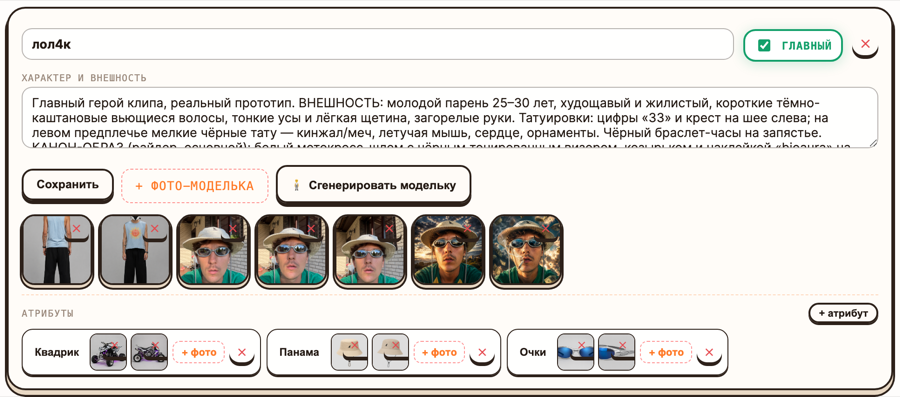
!Character card: description of the looks, reference photos and attributes
The description does the work
The field is Personality and looks, and its tooltip is blunt about what happens to it: *goes into the prompts word for word.*
So write it as a description a stranger could draw from, not as a wish:
> Short, mid-thirties, shaved head, heavy brow, permanent squint. Grey tracksuit > with a white stripe, black slides, a thin gold chain. Moves slowly, never smiles.
Not:
> A cool guy with a strong presence, iconic look, very charismatic.
The second one produces a different cool guy every scene. Adjectives about vibe are not features a model can hold constant; a shaved head and a white stripe are.
Concrete beats poetic on three things especially: hair, wardrobe, build. Those are what the eye uses to recognise a person across a cut.
Photos versus a generated model sheet
Two ways to lock a face:
+ reference photo uploads your own images. Free. If you have a photo of the person the clip is about, this is the better option — the face is real and it stays real.
Generate model sheet draws a four-angle turnaround from your description and whatever photos you have already uploaded. It costs 2 credits on the free and PRO plans, 8 on PRO MAX and STUDIO, where it is drawn by a paid image engine that can take many separate reference photos at once instead of one collage.
A turnaround is worth more than a single portrait: it gives the frame generator the face from the side and the back, which is where one-photo characters usually fall apart.
Practical order: upload two or three photos first, *then* generate the model sheet. It uses them as reference, and you get a turnaround of your person rather than an invented one.
Attributes are separate on purpose
Attributes are the character's signature objects: a hat, glasses, a quad bike, a specific jacket. They get their own name, their own description — which also goes into the prompts — and their own photos.
They are separate from the character because they are not always in the frame. On each scene card you toggle which characters are present, and which of their attributes come with them. The helmet is in the riding scenes and not in the kitchen scene, and the face stays the same in both.
Folding the quad bike into the character description instead means it appears in the kitchen scene too. This is the single most common way a character setup goes wrong.
Mark your lead as main. It is the one the story leans on when the model has to choose whose scene this is.
Why the same hero across clips
The five accounts we studied — 640+ videos between them — share one structural habit: their characters are franchises. The same rat, the same monks, the same recurring guy, in part II and part III. Not one clever video, a returning cast.
The numbers behind that habit are lopsided. In every account we measured, the top ten videos took 44–68% of all views, and the gap between the best video and the median ran from 11× to 595×. You cannot aim at the hit. What you can do is make the hit collectible: when one clip lands, a viewer who liked it has somewhere to go, and the next clip starts from an audience instead of from zero.
A recurring character is what makes that possible. It is also, practically, the cheapest thing in the studio: the description and the photos are already saved, cloning them into the next project is one dialog, and it costs nothing.
Common failures
No character at all. The story invents people, and they change every scene. The one-click pipeline refuses to start for this reason — it wants a track with audio, a style, and at least one named character.
A description of a mood. See above. Rewrite it as features.
Too many characters. Three named people in a thirty-scene clip is already a lot to hold. Two is comfortable. One plus a crowd is often better than two.
Attributes buried in the description. Pull them out. That is what the attribute list is for.
A model sheet generated before any photos. You get a stranger, and then you spend the rest of the clip trying to make that stranger look like your idea.